Available for Hire
Do you need technical advise or help with a project?
Get in touch, send an email to :
unrar.extract.and.recover@gmail.com
Donate to support development
UER is free and open source, receives great reviews and gets 8,000-10,000 downloads per month.
UER is completely clean. It contains no viruses, no spyware, no adware, no add-ons, no third party installers
while is regulary scanned by various download sites like Softpedia, File Cluster Labs, downloads2k
Also, the UER web site contains no adverts, no pop ups, no cookies !
The only support comes from its users' donations.
So if you like UER and want to activelly support the project and its development then you might consider donating. Thanks!
"Open Source batch extraction of RAR compressed archives"
Spanish Softonic's Editor rate 7/10
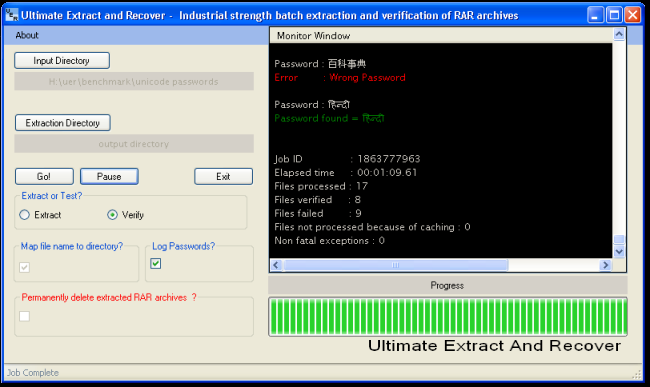
What is Unrar Extract and Recover
- Extracts .RAR archives and can list information embedded inside the archives
- Using multiple passwords to protect your files? It frees you from having to remember each individual password by keeping a single password depository so letting you choose as many passwords as needed.
- Have you forgotten the password of a password protected archive? Can retrieve the password by using the dictionary approach. Give it a wordlist and it will attempt all words against the archive. Once it retrieves the password it continues with extracting the archive
- Automated file integrity validation
Advantages
Unrar Extract and Recover does not reinvent the wheel since
protecting the file with a password and unlocking the file by using a
password is built-in functionality of the WinRar
software. The difference is that Unrar Extract and Recover uses this
functionality to introduce batch job capabilities. Instead of going
through every file and typing your password to unlock it, the
application does that for you by retrieving and using your password
from within a plain text file. It even goes one step beyond since after
unlocking the file it continues with extraction of its contents.
Rationale behind this software release
-
Do you compress your files to save storage space? Then, when about to extract your files you don't want to, or have time to, go through them one by one?
Use fire-and-forget functionality. Just point to the directory holding the archives and the software will automatically extract each one (optionally into its own subdirectory) with no user intervention. It saves you the time and the dull task of going through the files manually therefore you can use your precious time productively.
-
Do you compress and protect your valuable data/files by using a password?
Unrar Extract and Recover frees you from having to remember each individual password and its correlation to the file(s) , by keeping a single password depository so letting you choose as many passwords as needed. All you have to do is keep your passwords into one file (password_file.txt), essentially called a pass-wordlist, and when about to extract just feed the program the wordlist; it will check each password one by one against all files until it finds the correct one; then it continues with the extraction as expected.
-
Another use of this software is that of password recovery. Have you forgotten the password of a password protected archive?
Can retrieve the password by using the dictionary approach. Give it a wordlist with your common passwords and it will attempt all words against the archive. Once it retrieves the password it continues with extracting the archive. UE&R cannot guess the password required since it has no brute force functionality
-
A pleasant side effect of its design is that it can be used as an automated file integrity validation tool. When batch processing your files it checks for broken multipart files, files with corrupted headers, CRC errors, etc and logs all errors into a text file; hence it enables you to check that your files are valid without requiring your attention
Aimed at businesses/individuals who compress their valuable data by
using RAR compression to save space and are concerned with security
thus they also protect those compressed archives with passwords.
This software allows them to use multiple passwords by not having to
remember each password individually and saves them the personal time
required for extracting that data by utilizing just CPU time.